Combo và workflow đề xuất cho SSH remote coding
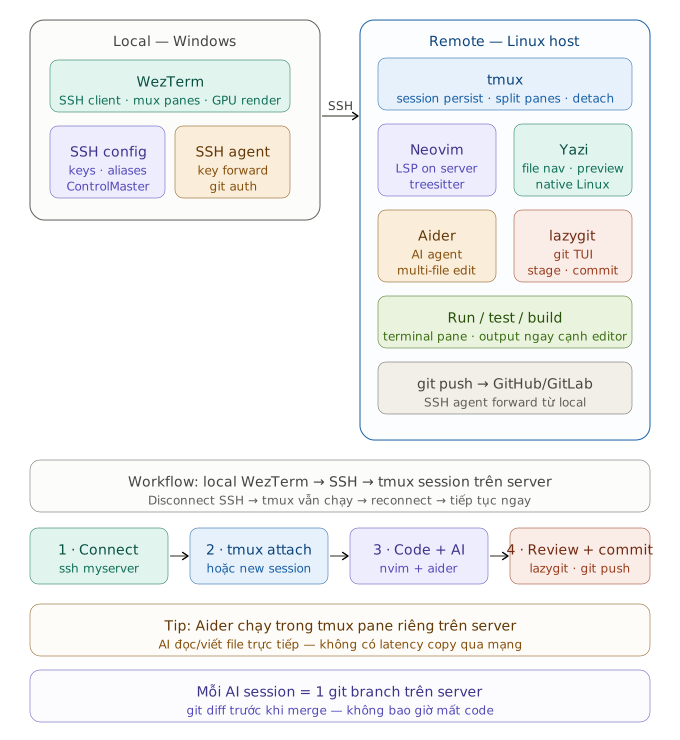
Combo đề xuất
Local (Windows): WezTerm + SSH config
Remote (Linux): tmux + Neovim + Yazi + Aider + lazygit + Git
Tại sao combo này phù hợp hơn workflow WSL2
Khi code qua SSH, toàn bộ toolchain chạy trực tiếp trên Linux server — không có vấn đề MIME type, không cần WSL, Yazi preview ảnh hoạt động ngay vì ueberzugpp có native Linux. LSP server, treesitter, Aider đều chạy sát code, không có latency copy file qua mạng.
Điểm quan trọng nhất là tmux — nó giữ session sống kể cả khi bạn đóng WezTerm, mất kết nối, hay đổi mạng. Reconnect lại là tiếp tục ngay chỗ cũ.
Setup SSH config trên Windows
Trong ~/.ssh/config:
Host myserver
    HostName 192.168.1.x
    User yourname
    IdentityFile ~/.ssh/id_ed25519
    ForwardAgent yes
    ControlMaster auto
    ControlPath ~/.ssh/cm-%r@%h:%p
    ControlPersist 10m
    ServerAliveInterval 30
ForwardAgent yes cho phép git push lên GitHub từ server dùng SSH key của local — không cần tạo key mới trên server.
ControlMaster tái dùng connection đã mở, mở tab WezTerm mới vào server gần như instant.
Setup trên remote server
# tmux plugin manager
git clone https://github.com/tmux-plugins/tpm ~/.tmux/plugins/tpm

# Yazi + dependencies
sudo apt install file ffmpegthumbnailer ueberzugpp chafa fd-find ripgrep

# Aider (AI agent tốt hơn Codex cho multi-file)
pip install aider-chat

# lazygit
LAZYGIT_VERSION=$(curl -s https://api.github.com/repos/jesseduffield/lazygit/releases/latest | grep tag_name | cut -d '"' -f 4)
curl -Lo lazygit.tar.gz "https://github.com/jesseduffield/lazygit/releases/download/${LAZYGIT_VERSION}/lazygit_${LAZYGIT_VERSION#v}_Linux_x86_64.tar.gz"
tar xf lazygit.tar.gz lazygit && sudo install lazygit /usr/local/bin
Tại sao chọn Aider thay vì Codex CLI
Aider tự tạo git commit cho mỗi thay đổi nó thực hiện, nên lịch sử git luôn sạch và revertable. Nó cũng đọc toàn bộ context của repo thay vì chỉ file đang mở, phù hợp khi refactor cross-file.
